Specifica — Multi-level bills of materials with cost, labour and substitutes
Rolls up quantities through the product tree, substitutes interchangeable components by the rule you set and calculates the cost of each variant. Switching the variant recalculates the costing without touching the bill of materials.
Windows and Linux, 64-bit. Free for individuals and for organisations with up to 100 employees, commercial use included.
The program has an English interface since version 1.2.0: choose it in Help → Language.
Features
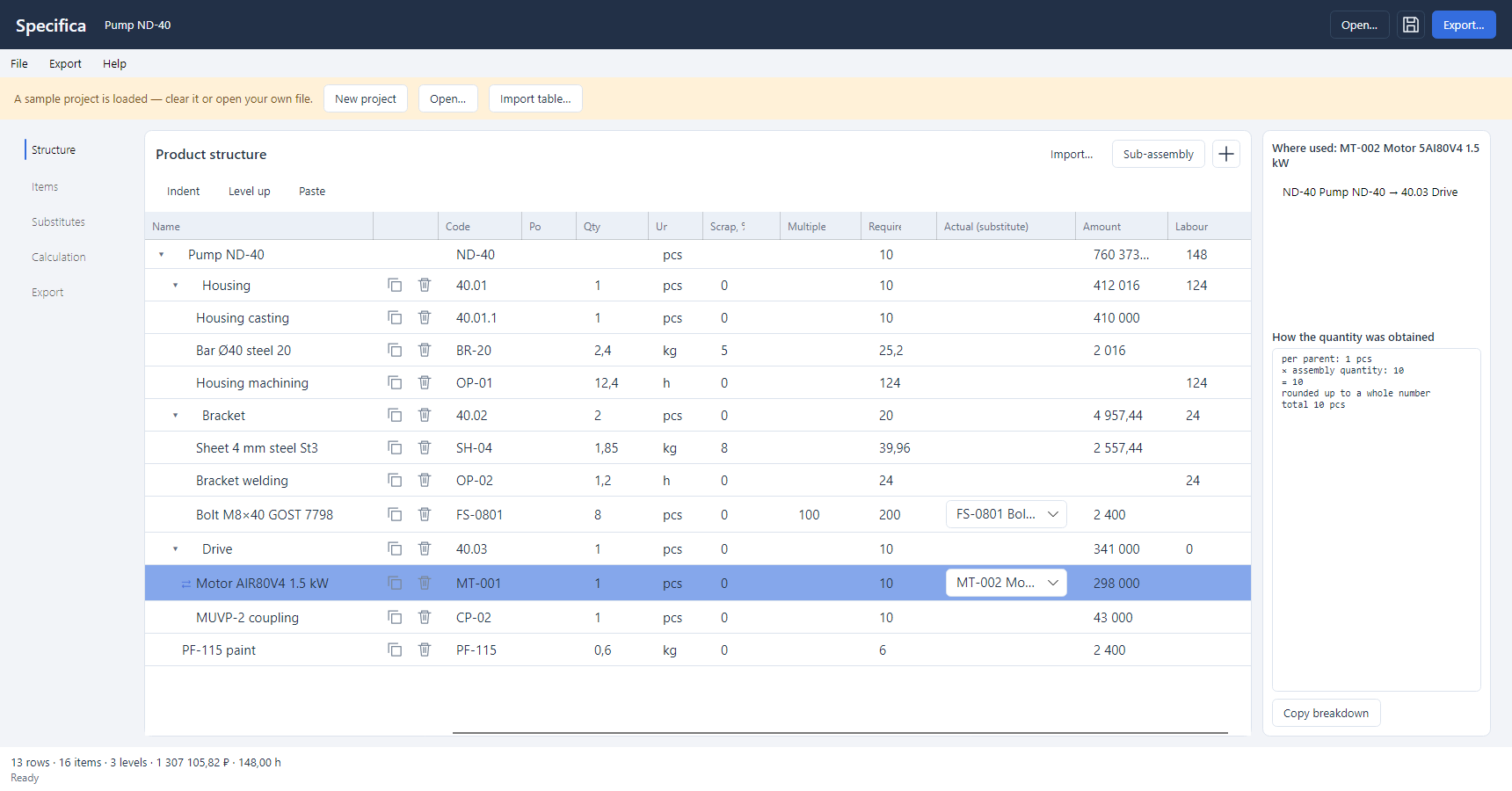
Product tree
- Editing in place: a sibling row, a subassembly, changing the level with Alt+→ and Alt+←.
- Row buttons: copy an occurrence with its parameters and substitute choices, delete with Ctrl+Z to undo.
- Protection against cycles and a depth limit.
- Quantity order: scrap → setup → multiple → rounding.
- Every row shows how its quantity was calculated.
Interchangeable components
- A group with a base item, a factor and a direction of substitution.
- Selection rule: lowest price, priority or manual choice.
- Substituted rows are marked with ⇄ and an explanation.
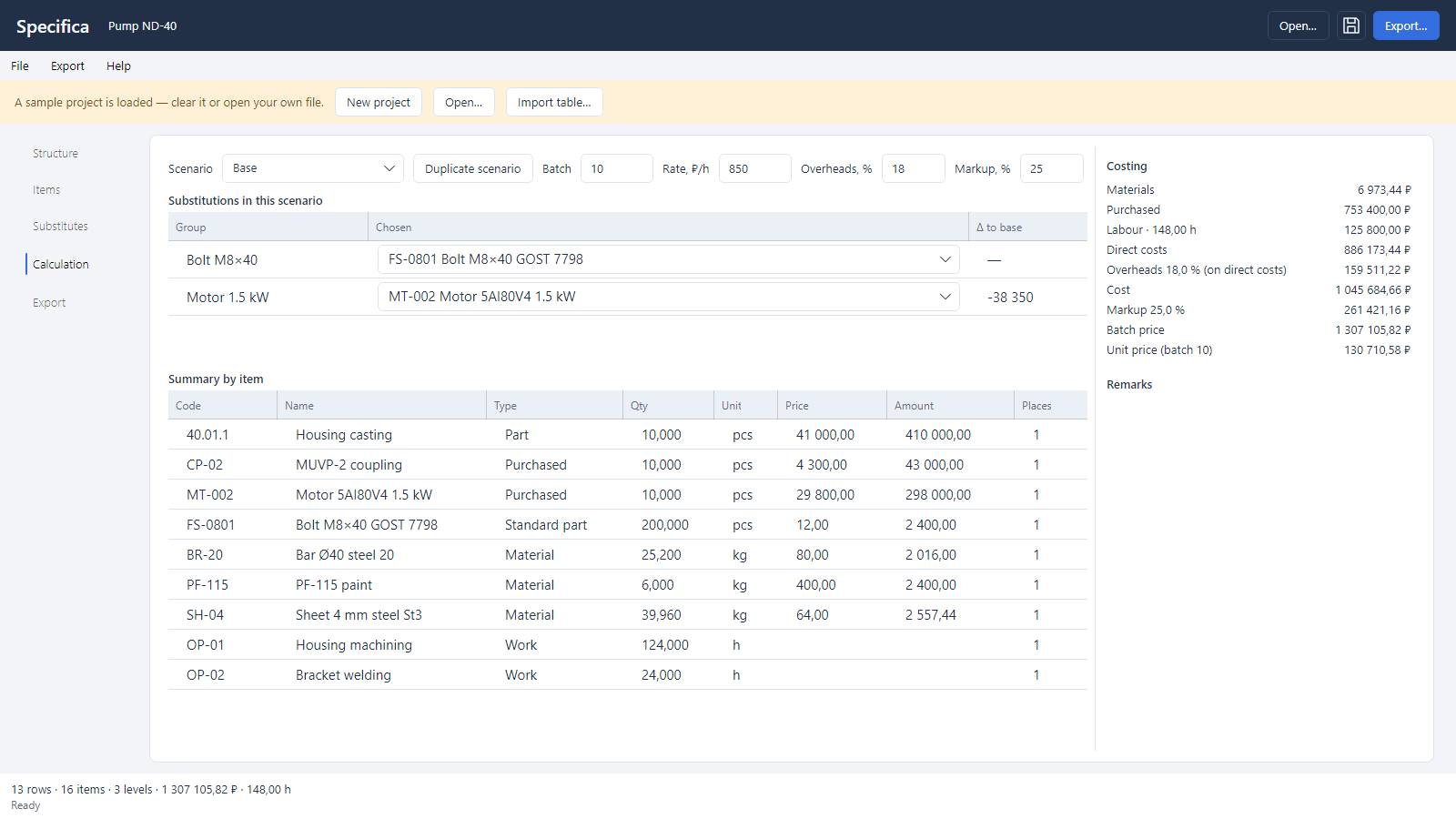
- Scenarios let you compare calculations without copying the project.
Cost and figures
- Cost by a fixed chain: materials → direct costs → cost price → price.
- Configurable labour rate, overheads and markup.
- Custom numeric columns with formulas; the interpreter is limited to arithmetic and runs no external code.
- Summary: a flat list of requirements by item, with where-used.
Input and output
- CSV, TSV and XLSX import that recognises five forms of hierarchy, with a tree preview.
- Pasting tables from Excel with Ctrl+V.
- Export: a five-sheet Excel workbook with grouped rows, PDF, CSV with the structure and the summary.
- The .specifica project file is readable JSON with a schema version.
- Light and dark theme following the Windows setting.
What's new
Version 1.2.1 · 9 November 2026
- Saving is now crash-safe: a failed write or a power cut can no longer leave a damaged .specifica file.
- The Excel export stores quantities, prices and totals as numbers, so sums and sorting work right away.
- Text that looks like a formula (=, + or − at the start) is no longer executed in Excel or CSV.
- A formula with an empty function call, such as MIN(), reports a clear error instead of silently stopping the recalculation.
Version 1.2.0 · 29 October 2026
- English interface: choose the language in Help → Language and the program remembers it; on the first start it follows the language of Windows.
- Documents follow the interface language: bill of materials and costing in PDF, Excel and CSV.
- Units, built-in columns and the sample project are shown in the interface language, and a project file opens the same in either language.
Version 1.1.2 · 28 October 2026
- Questions, comments and suggestions go to a private chat with the support bot — in Telegram or MAX, whichever you prefer; the operator replies in the same chat.
- The help window has a button for each messenger, and the request is tagged with the program automatically.
Version 1.1.1 · 18 October 2026
- New main window: sections on the left; the name and the row actions stay in place when the tree scrolls horizontally.
- Row buttons copy an occurrence together with its parameters and substitute choices in scenarios, and delete it. A catalogue item can be copied without its components.
- Deleting a row, an item or a substitute can be undone with Ctrl+Z or the button at the bottom of the window until the next edit.
- The plus adds a row and opens its name for editing right away; a new name entered in the tree appears in the catalogue.
- Improved reliability and stability; updated program components.
Version 1.1.0 · 11 October 2026
- The program checks for new versions itself; Help → Check for updates downloads them, verifies the signature and installs them.
- The help now has a «Data and internet» section: what the program sends to the site, and when.
Version 1.0.1 · 22 September 2026
- Better handling of the product tree and scenarios, improved stability.
Version 1.0.0 · 27 July 2026
- First release.
Terms of use of Specifica
Free and perpetual for individuals, for any purpose including professional work. Free and perpetual for organisations and sole proprietors with up to 100 employees, commercial use included. No registration, payment or notice to the copyright holder is required. Larger organisations need a separate paid licence and have 30 days of free use to arrange it. Bills of materials, summaries, costings and exports made in the program belong to the user, with no restrictions or royalties.
This is a summary. The legally binding document is the
licence agreement in Russian; the same file ships in the
archive as LICENSE.md and opens from the program's help. An English translation
is provided for reference.
System requirements
Windows
Windows 10 version 1809 or later, or Windows 11, x64. The build with bundled .NET needs no additional components.
Linux
A 64-bit distribution with a desktop environment; tested on Ubuntu 24.04 LTS. Requires the system libraries libicu, libX11, libICE, libSM, fontconfig and the DejaVu fonts; most distributions have them installed.
Files and settings
Projects are saved to .specifica files — readable JSON with a schema version.
Settings and the current session are kept in
%APPDATA%\Specifica on Windows
and ~/.config/Specifica on Linux.
Support
The built-in help opens with F1: how the calculation works, file formats, keyboard shortcuts and system details for a support request. Bug reports and suggestions are welcome in support — in a chat with the bot.
Software for your processes
Specifica was developed for a client's production task. We build similar solutions to order: specification, architecture, development, rollout and support. A working prototype in as little as one week.